
Article
AI integration services for businesses
A simple AI integration, such as a chatbot, can take a few hours or days. More advanced solutions can take several months to develop and test. The…
Jowena Borral · Software development · 4 November 2026

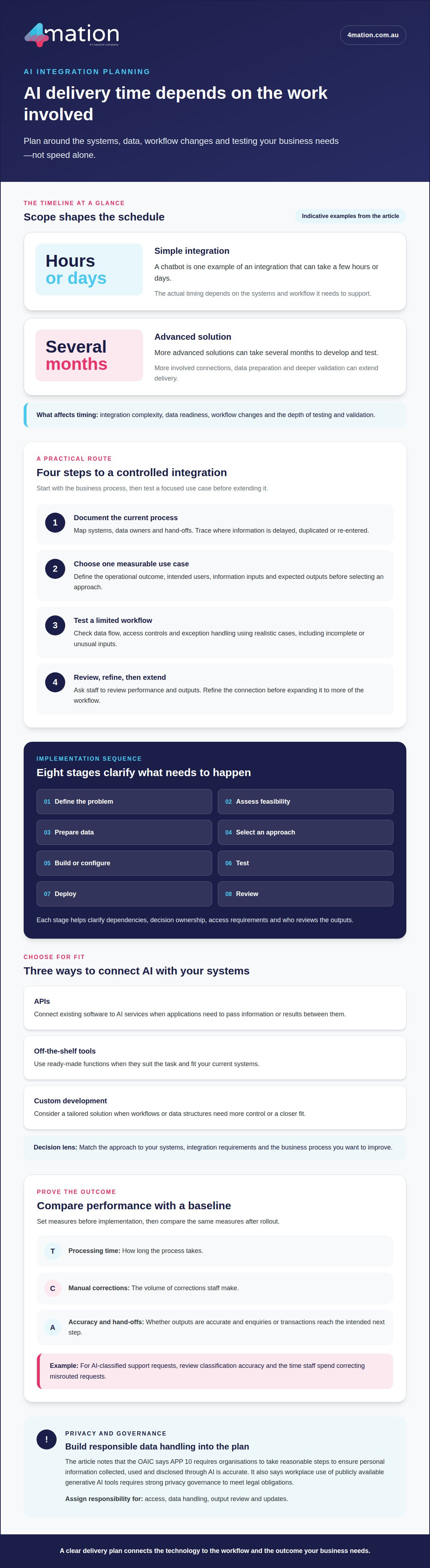
A simple AI integration, such as a chatbot, can take a few hours or days. More advanced solutions can take several months to develop and test. The timeline depends on the work involved, including system connections, data preparation and testing. To understand how AI integration fits your business, start by identifying the systems and processes the solution needs to support.
It’s reasonable to want a clear delivery timeframe before committing to an AI project. But speed alone isn’t a useful measure of success. The integration needs to fit your existing systems and processes, and give your team a reliable way to use it.
This guide explains how AI integration connects business systems, deploys machine-learning models, and adds chatbots and AI agents to workflows. You’ll also learn what affects implementation time, how to plan a practical rollout and where to focus so the technology supports measurable business outcomes.
Key Takeaways
Map how your current systems share data before choosing an AI solution, so the integration supports existing workflows.
Set a clear business goal and plan for data readiness, testing and rollout before development begins.
Use relevant business data to make machine-learning outputs more useful to your organisation.
Design chatbots around the information customers need and the tasks they should be able to complete.
Identify repetitive, document-heavy processes where AI agents could reduce manual work and help your team focus on higher-value tasks.
Table of Contents
Ensuring AI tools work with existing business systems
Start with the workflow, not the AI model. Map each system, hand-off and repeated task before choosing a platform. For example, trace how a customer enquiry moves from a website form into a CRM and then reaches the sales team. This reveals where information is delayed, duplicated or re-entered. Connect each proposed use case to an outcome, such as faster enquiry handling or fewer manual corrections.
APIs connect existing software to AI services, while off-the-shelf tools provide ready-made functions. Custom development offers more control when workflows or data structures need a tailored fit. The right option depends on your systems, integration requirements and the business process you want to improve.
To integrate AI into business software, identify the data source, the system that needs the result and the next step in the workflow. For example, an AI tool could classify an incoming support request and pass its category to a service platform. Test that hand-off with realistic cases before relying on it in daily operations.
In Australia, the Office of the Australian Information Commissioner says APP 10 requires organisations to take reasonable steps to ensure personal information collected, used and disclosed through AI is accurate. The OAIC also says workplace use of publicly available generative AI tools requires strong privacy governance to meet legal obligations.
Assess use cases across business functions before deciding what to connect. In customer service, a chatbot can draw on website content and selected documents. In operations, image processing can extract text or identify objects for inventory workflows. In finance, AI can help sort structured data and perform complex calculations. Each use case needs a defined input, output and staff review point.
Measure return on investment against a baseline set before implementation. Track the time a process takes, the volume of manual corrections and whether enquiries or transactions reach their intended next step. Compare the same measures after rollout. For example, if AI classifies support requests, review classification accuracy and the time staff spend correcting misrouted requests.
A practical integration plan can follow four steps:
Document the current process and systems, including data owners and hand-offs.
Choose one use case with a measurable operational outcome.
Test data flow, access controls and exception handling in a limited workflow.
Review performance with staff, then refine the connection before extending it.
For example, connect a website chatbot with Slack or WordPress only when the connection supports a defined customer or staff workflow. A deliberate sequence keeps the integration aligned with business needs.
These connections can also use AI-generated insights to allocate resources strategically, optimise processes and reduce risk, while image processing extracts text, generates descriptions and detects objects.
AI consulting and implementation planning
A sound implementation plan connects an AI opportunity to business priorities, delivery steps and measures of success. In Australia, AI integration might use existing platform features, application programming interfaces (APIs) or custom-built systems. The right approach depends on what the technology needs to do and how it fits your operations.
Implementation Steps and Timelines
Australian businesses can work with AI consultants and implementation specialists across strategy, data, software development and system integration. Options include cloud-based AI services, tools built into business software and APIs that connect applications. Evaluate them against your current systems, the task and your customisation needs.
Begin by selecting a process with a clear operational need. Assess its data, systems, users and decision points. Then define success before selecting a model or platform. For example, a retailer could investigate whether demand forecasting can inform stock planning and reduce avoidable inventory decisions.
Implementation usually follows a deliberate sequence: define the problem, assess feasibility, prepare data, select an approach, build or configure, test, deploy and review. Each step identifies dependencies and clarifies who owns decisions, provides access and reviews outputs. This helps teams plan AI integration around actual business requirements.
Simple AI integrations, such as chatbots, can take a few hours or days. Advanced solutions can require several months of development and testing. Timelines depend on integration complexity, data readiness, workflow changes and the depth of validation. A limited pilot can show whether an approach fits before a broader rollout.
Planning and Testing
Planning translates a business goal into requirements that developers and staff can evaluate. Document the intended users, information inputs, expected outputs and cases requiring human review. For a demand-planning tool, specify which records it uses, how teams interpret forecasts and what happens when information conflicts.
Test the solution under real operating conditions, including incomplete inputs and unusual cases. Ask staff who understand the process to review the results. Their feedback can reveal terminology, exceptions or hand-offs that technical checks may miss, making testing more representative of everyday use.
Set evaluation measures before the pilot starts. Depending on the task, these might include processing time, forecast accuracy or staff corrections. Compare results with the current process, then decide whether to refine, extend or stop the trial. Record changes so you can understand how each adjustment affects performance.
Good governance assigns responsibility for access, data handling, output review and updates. If you’re planning an AI integration, discuss your implementation requirements with the team.
These measures should reflect the process selected and the intended outcome, with staff reviewing whether results are useful in operating conditions. Compare the pilot with the existing process, then use the findings to decide whether to refine, continue or broaden the work. Idea Link estimates that more complex AI systems typically take 2-6 months to develop. Keeping development time in view can support realistic planning alongside data readiness, integration complexity and validation needs.
Deploying machine-learning models into existing infrastructure
A model creates business value when it fits the systems and decisions your team already uses. Deployment connects its inputs and outputs to an application, database or workflow, so predictions can inform a practical next step. For example, a forecasting model might analyse historical sales data and send demand estimates to an inventory system. The design needs to account for data quality, access, performance and staff review.
Security, accuracy and bias risks can arise when a model receives sensitive information, produces incorrect outputs or reflects limitations in its training data. Restrict access to relevant data, test outputs against representative examples and retain human review for decisions with material consequences. For example, a team can review flagged transactions before acting on a model’s classification.
Before deployment, define how data moves between the model and business application. Identify the source, format, permissions and destination for each input and output. A customer-support model, for instance, might receive an enquiry from a service platform and return a suggested category. Decide how the application handles missing data, model errors and outputs that need escalation.
ChatGPT and other large language models can summarise documents, draft responses to enquiries and classify text. They can support an existing programme through an API or sit within a custom application that gives staff a controlled interface. Some AI functions can work without your organisation’s own data by using pre-trained models. Relevant organisational data can make outputs more specific to your terminology and processes.
Fine-tuning adapts a model using examples suited to a particular task. It may help when a general model repeatedly misses specialised language, such as product codes or industry-specific categories. First, check whether clearer instructions, selected reference documents or better input data would address the problem. Fine-tuning requires suitable examples and evaluation, so use it to solve a defined performance gap rather than add complexity without purpose.
Test the model before connecting it to live workflows. Prepare examples that reflect routine requests, unusual cases and incomplete records. Compare the model’s output with the expected result, record errors and decide what needs correction. For a document-classification model, check that similar files receive consistent labels and uncertain cases reach a staff member.
After release, monitor output quality and operational fit. Review errors, user feedback and changes in incoming data, then retest after updates to the model or application. A change to a form field, for example, can affect the information a model receives. Documenting changes helps teams trace performance issues and maintain dependable workflows.
AI chatbots and website features
A website chatbot can answer routine questions, guide visitors and capture enquiries while your team focuses on complex requests. A well-designed solution draws on approved website content and selected documents, so responses reflect your organisation’s information. Define its purpose first. For example, a service business might help visitors find relevant information before they submit an enquiry.
A chatbot can be integrated into your website and made available to visitors 24/7. It can use website content alongside selected Word and PDF documents. That gives visitors a way to ask questions in plain language, rather than searching across several pages or files. The value depends on keeping its information relevant to the questions users actually ask.
Generative AI models can summarise documents, draft responses to enquiries and classify text. In a website experience, these capabilities can help a chatbot explain a policy, suggest a next step or direct a visitor to relevant information. The chatbot can also gather contact details, capture potential customer enquiries, offer advice or guide users through an order.
Useful integrations connect the chatbot to tools your team already uses. Depending on the workflow, these can include WordPress, Slack, WhatsApp and Zapier. For example, a website enquiry could be passed to a communication tool for follow-up. Connecting multiple communication tools and information sources can reduce manual hand-offs, provided each connection has a clear purpose.
Plan the experience around real visitor tasks. List common questions, approved answers and situations that need a staff member. Organise the source material and decide how the chatbot should respond when information is missing. It might answer a product enquiry from a selected document, while capturing a complex request for human follow-up.
Use current website pages and selected documents as information sources.
Set clear boundaries for advice, order guidance and enquiry capture.
Connect tools such as Slack or WhatsApp only when they support a defined hand-off.
Review conversations and update source content when answers need correction.
Before launch, test the chatbot with realistic questions from customers and staff. Check whether answers match approved content, enquiry details reach the intended destination, and confusing requests receive a useful response. For example, test differently worded questions about the same policy. This can reveal gaps in source material and help you target updates.
Ongoing content and technical support can cover setup, integration, customisation, training and testing. Treat the chatbot as part of your website experience, not a one-off feature. Review visitors’ questions, correct outdated information and refine the hand-off when a task needs a person. This keeps the solution useful as your services and website content change.
AI agents and workflow automation
An AI agent can interpret information, choose from defined actions and move a task forward. In a business workflow, it might read an incoming request, identify its purpose and prepare the next step. Automation connects that decision to existing software, reducing repetitive hand-offs while keeping the process visible to staff.
Consider an accounts team receiving supplier invoices by email. An agent can extract invoice details, compare them with purchase records and flag mismatches for review. Document processing can reduce data-entry time, accelerate transaction processing and reduce errors. Staff still decide how to handle exceptions, such as a missing purchase order or conflicting amount.
AI agents can also support customer service, operations and internal administration. A service agent might classify a support request and assign it to the right queue. An operations workflow could sort documents for a team member to review. Start with a repeated task, clear inputs and a defined outcome, rather than automating for its own sake.
Plan the workflow before connecting an agent to business systems. Map the trigger, information needed, permitted actions and expected result. For an invoice process, specify which records the agent can read, what fields it can extract and when it must stop for approval. This gives the team a practical basis for testing.
Build automation in controlled stages:
Choose one recurring process and document its current steps.
Set boundaries for the agent’s access and actions.
Test routine cases, missing information and conflicting records.
Route uncertain decisions to a staff member.
Review results and refine the workflow before expanding it.
For example, test an agent on invoices with different layouts and incomplete fields. Check whether it extracts the right details, follows approval rules and records its actions. If it cannot resolve a mismatch, the workflow should pause and direct the case to an accounts officer. These controls help keep business decisions accountable.
Choose measures tied to the task, such as time spent entering information, processing delays or staff corrections. Review them alongside user feedback and exceptions. If an agent saves manual steps but creates extra review work, adjust its instructions or workflow before extending automation to other processes.
Successful automation also needs clear ownership. Assign someone to review exceptions, update process rules and assess changes to connected systems. As your business processes evolve, revisit the agent’s permitted actions and test the updated workflow. If you’re assessing where agents could fit, talk with us about your workflow automation needs.
4Mation: Custom Software Development
4mation Technologies helps businesses connect AI with the software and workflows they already rely on. Its custom software development and AI consulting and implementation can support projects that need tailored integrations, model deployment or workflow automation.
Turn to 4mation when you have a defined business problem but need help shaping the right technical approach. Together, we can assess your goals and requirements, then develop an implementation suited to your systems and users. For example, a business may need a web application that brings AI-assisted document processing into an existing operational workflow.
If you’re ready to discuss how AI could fit your business, contact 4mation to discuss your requirements.
Make your next AI decision a practical one
Choose an operational challenge where a change would make a clear difference to your business. Consider how AI integration could support that goal, who would use the result and how you would assess its value. A focused starting point helps your team make a considered decision before committing to broader change.
Bring together the people who understand the process, the technology and the desired outcome. Their perspectives can clarify what needs to change and what a workable first step looks like.
When you’re ready to explore an approach for your organisation, contact 4mation to discuss your AI integration goals.
A clear business objective gives your next decision a practical foundation.
Frequently Asked Questions
How long does AI integration take?
A simple integration, such as a chatbot, can take a few hours or days; advanced solutions can require several months of development and testing. The timeline depends on the level of customisation, the number of connections and how thoroughly the business needs to validate outputs. A project involving complex data or several operational teams usually needs more planning and testing than a focused, self-contained application.
Can AI work without my data?
Yes. Some AI functions use pre-trained models, so you can apply them without supplying your organisation’s own data. For example, a general-purpose model can help draft or summarise text. Business data becomes useful when you need outputs that reflect internal terminology, products or procedures. Decide what information the task genuinely requires, then consider access, privacy and review before connecting internal records.
What does AI integration mean for businesses?
AI integration means putting an AI capability into a business application or process so people can use its outputs as part of their work. For example, an online retailer could add product-recommendation logic to its customer experience, while keeping purchasing and fulfilment in existing systems. The practical aim is to support a defined business activity, not simply add an AI feature without a clear role.
What are common AI integration use cases in Australia?
Australian organisations can apply AI to tasks such as sorting documents, forecasting demand, analysing customer feedback and extracting information from images. For example, a construction supplier could trial image recognition to categorise incoming product photos, while a professional services firm could sort routine enquiries for staff review. The right use case depends on the process, the available information and how employees will use the result.
How much does AI integration cost in Australia?
The cost depends on the project and is provided after a quote request. Key factors include the number of systems to connect, data preparation, the level of custom development, security requirements and the testing needed before release. A contained feature within an existing application has different delivery needs from a solution involving several workflows and data sources. Define the business outcome and project scope to support a useful estimate.