
Article
Application Modernization Strategy: Choose Your Approach
Replacing a legacy application isn’t always the best way to modernise. An application modernisation strategy sets out how to update existing software…
Jowena Borral · Software development · 13 November 2026

Replacing a legacy application isn’t always the best way to modernise. An application modernisation strategy sets out how to update existing software so it better supports your business, without assuming every system needs replacing. The right approach depends on what each application does, how it connects to other systems and what you need it to deliver next.
It’s understandable to focus on technology, but modernisation also affects productivity, customer experience, operating costs and the risks of changing systems people rely on. It works best when it supports a broader business goal and accounts for what must keep working during the transition.
This article explains what application modernisation involves and how to choose an approach for each application. You’ll also learn how deployment models, data migration, testing and cutover planning fit together, so you can build a practical plan that supports digital transformation while keeping essential operations on track.
Key Takeaways
Assess each legacy application’s business role, technical constraints, dependencies and future needs before deciding what to modernise.
Match the approach to the application: moving it with minimal changes, adapting it or rebuilding it each involves different trade-offs.
Choose an on-premises, hybrid or cloud deployment model based on the control, flexibility and operational complexity your business can manage.
Plan data migration and cutover in stages, with testing and rollback planning to help protect business operations.
Connect application changes to wider transformation goals, and consider custom web application development when existing systems no longer support the outcomes your business needs.
Table of Contents
What is application modernisation?
Application modernisation updates existing software to meet changing business and technical needs. A sound application modernisation strategy starts with evidence about each system, its infrastructure and the outcomes your organisation needs.
Legacy Application Assessment
An assessment of a legacy application records what it does, who depends on it and how it operates. This matters because changing or replacing one component can affect connected services, data and day-to-day work.
Start with an inventory of capabilities, integrations, data, owners, runtime environments, vendor contracts, security posture and technical debt. Map current steps, systems, hand-offs and data flows. For example, trace how a customer request moves from an online form into a legacy database and then into staff workflows. This reveals which functions need to remain available during modernisation.
Technical Debt and Infrastructure
Technical debt is the ongoing effort created by outdated or difficult-to-maintain design choices. Assess it alongside infrastructure, because the application’s operating environment can constrain reliability, changes and future growth.
Review code dependencies, maintenance effort, deployment processes and recurring operational friction. Then assess whether the application runs on premises, in the cloud or across both, and identify infrastructure constraints. For AI readiness, check whether relevant data is accessible, consistently structured and governed, and whether the application can exchange it with other systems. These findings clarify what needs to be addressed before adding AI features.
Modernisation Goals and Planning
Modernisation goals define the business and technical outcomes an application must support. A clear target helps teams compare options and judge whether each change delivers value.
Set goals before choosing an approach, then record the baseline and intended measures. These might include processing time, manual hand-offs, deployment frequency, service reliability or user effort. To assess return on investment, compare the baseline with results after modernisation, accounting for delivery effort, ongoing operations and benefits such as reduced rework. Choose measures tied to the business case, not activity alone.
Costs and timelines in Australia depend on the application’s complexity, dependencies, data, infrastructure and chosen scope. A system with extensive integrations or difficult data migration requires different planning from a contained application with clear ownership.
Bring business, engineering and security teams together to agree what must be preserved, what should change and how success will be measured. This assessment connects application constraints with business priorities, providing a practical basis for sequencing work and tracking outcomes.
When should you choose rehost vs refactor vs rebuild?
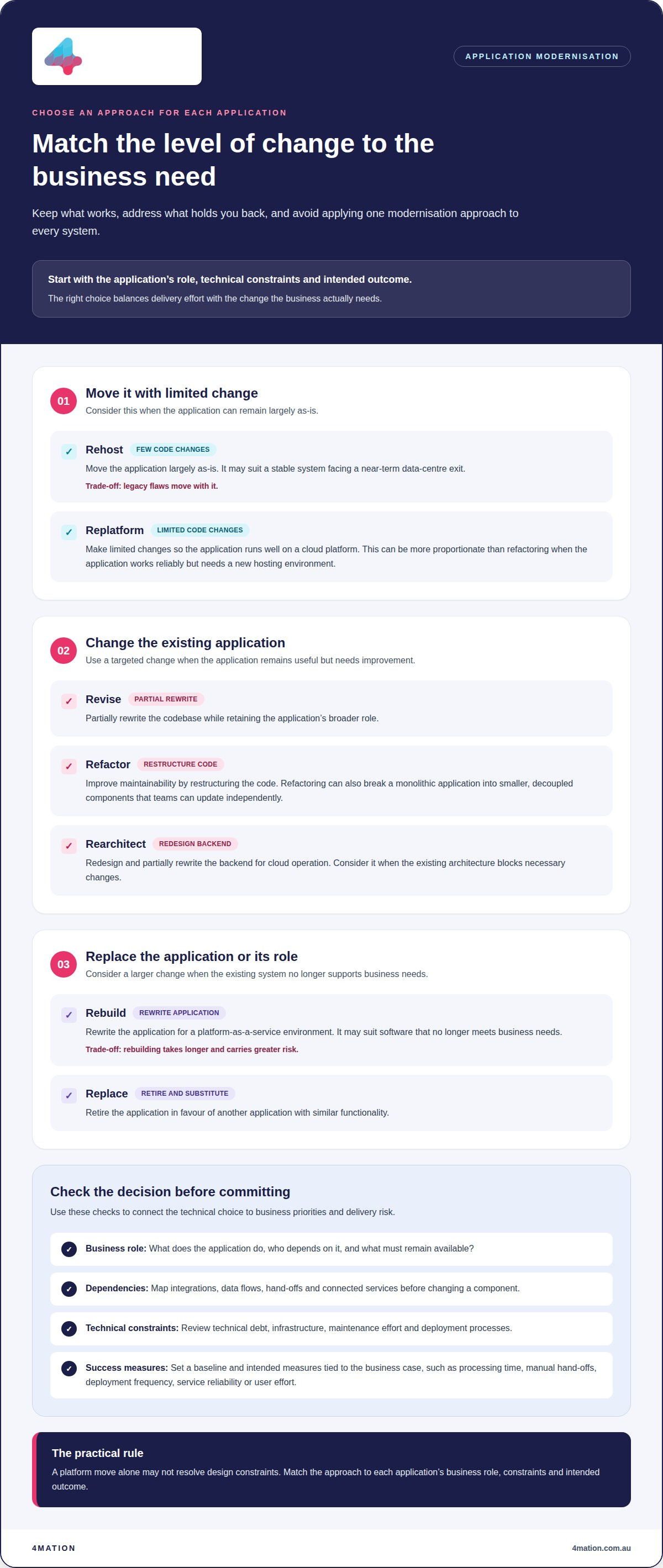
Choose a modernisation approach for each application, not for the entire enterprise portfolio. The right option depends on business needs, technical debt, architecture and the change required.
Modernisation Strategy Options
These options describe how much of an application to retain, change or replace. A careful choice aligns delivery effort with the intended business outcome.
Rehost moves an application with few code changes. Revise partially rewrites its codebase, while refactor changes the code structure to improve maintainability. Rebuild rewrites the application for a platform-as-a-service environment. Replace retires it in favour of another application with similar functionality. For example, a stable system facing a near-term data-centre exit may suit rehosting, while software that no longer meets business needs may need rebuilding.
Migration and Architecture Approaches
Migration and architecture approaches determine how much an application must change to run effectively in its target environment. A platform move alone may not resolve design constraints.
Rehosting moves the application largely as-is. Replatforming makes limited code changes so it runs well on a cloud platform. Refactoring restructures code, while rearchitecting redesigns and partially rewrites the backend for cloud operation. If an application works reliably but needs a new hosting environment, replatforming may be more proportionate than refactoring. If its architecture blocks necessary changes, rearchitecting may address the underlying issue.
Trade-offs and Failure Points
Each option balances delivery effort against the problems it resolves. Rehosting is usually faster and cheaper than refactoring or rebuilding, but it carries legacy flaws onto the new platform. Refactoring can involve changing an application’s code to suit a new platform, while some architectural issues may remain. Rebuilding takes longer and carries greater risk, so it suits applications that cannot meet current business needs.
Common pitfalls include choosing one approach for every system, overlooking dependencies or treating a platform move as complete modernisation. These choices can preserve technical debt or introduce unnecessary change. Match each application’s approach to its business role, constraints and intended outcome.
Refactoring and Microservices
Refactoring can break a monolithic application into smaller, decoupled components. This is useful when teams need to update parts independently without changing the whole system.
Microservices can support separate deployment and operation, but splitting a monolith also introduces new integration and management needs. Refactor around clear business capabilities, such as separating order processing from reporting, rather than dividing code without a purpose. If your application’s options involve competing business and technical priorities, discuss the trade-offs with 4mation as part of your planning.
On-premises, hybrid, or cross-cloud?
Choose cloud providers by comparing workload requirements, integration needs, operational skills and governance. For Australian data, map its location, access and backups against applicable privacy and residency obligations before migration.
Cloud and Infrastructure Models
An infrastructure model determines where applications and data run, shaping control, scalability and operating effort. The choice matters because different workloads may need different environments.
On-premises datacentres offer direct control over infrastructure and data, but can be difficult to scale. They also require significant upfront investment and ongoing maintenance and service costs. An on-premises private cloud can help organise infrastructure, though it may retain some of the limitations of an infrastructure-centred approach.
Hybrid cloud connects on-premises infrastructure with cloud services, allowing applications and data to move across datacentres and public or private clouds. This can preserve existing investments while adding cloud scalability and cost efficiency. For example, an organisation might keep a tightly integrated legacy system on premises while moving a customer-facing application to cloud infrastructure.
Multi-cloud uses two or more public cloud services for flexibility, availability or cost optimisation. Containers package application code and dependencies so they run consistently across environments, including hybrid and multi-cloud. Microservices can divide an application into smaller components that may be deployed independently. APIs connect those components and other systems, while serverless platforms can reduce the need to manage server infrastructure for specific functions.
Governance, Resilience and Complexity
Cloud governance sets consistent controls for access, data, security and operational responsibilities across environments. Without it, a hybrid setup can create gaps between infrastructure teams and cloud services.
For hybrid operations, define which team owns each application, where its data flows and how integrations are monitored. Orchestration can automate container deployment, scaling and networking. A shared governance model helps teams apply consistent controls while managing distinct environments.
A cross-cloud strategy distributes workloads across platforms to reduce reliance on one provider and support resilience. However, teams must manage interoperability, monitoring and governance across providers. Separate software configurations may also be needed for each cloud, increasing operational work. Weigh this flexibility against the expertise and ongoing coordination it requires.
Choose a provider based on workload requirements, not a default preference for a particular platform. Compare data location, integration options, operational capability and the controls needed for each application. For an Australian organisation handling sensitive information, document where data is stored, who can access it, and how backups and transfers are managed. Apply relevant privacy and residency obligations to these decisions.
Modernisation, data migration, and cutover planning
Plan application changes, data movement and production cutover as connected workstreams. Clear ownership and sequencing help protect business processes as modernised systems take over.
Wave-Based Migration and Cutover
Wave-based migration moves application data and traffic in planned groups rather than changing everything at once. It gives teams a controlled way to test functionality and resolve issues while existing services continue operating.
Before development begins, obtain sign-off from engineering, security and business owners on the target architecture, data model and integration boundaries. For a customer portal connected to a billing system, define which records move first and how both applications exchange updates during the transition.
Then migrate data and traffic in waves, testing each wave in parallel against expected results. Rehearse rollback so teams know how to restore the previous service if a release fails. Schedule cutover as part of modernisation, and decommission the legacy system only after the production service has operated without issues for an agreed period.
After decommissioning, revoke legacy access, archive required data, close vendor contracts and capture lessons. These tasks help prevent an old application from remaining an unmanaged part of your operational environment.
Lift-and-Shift Migration
Lift and shift moves an application to a new environment with few or no code changes. It is usually the least intensive modernisation approach, but does not automatically improve functionality, scalability or technical design.
For example, moving a legacy application from an on-premises datacentre to cloud infrastructure may help meet a time-pressured exit. The application can keep running while the organisation plans further development. However, existing limitations and operational friction can move with it, so a faster migration may not deliver the desired long-term outcome.
To make lift and shift part of a broader plan, document each application’s capabilities, integrations and data before migration. Define the target architecture and identify follow-up work, such as improving deployment processes or adapting components for cloud scalability. This gives teams a path beyond relocation.
Cutover planning should account for data quality, traffic routing and business tasks that rely on the legacy system. A staged release can move a defined user group or workflow first, then expand once parallel testing confirms records and integrations behave as expected.
Keep the legacy application available during the agreed production observation period, with rollback roles and decision points documented. Once the modernised service performs as intended, complete decommissioning and confirm operational ownership.
Modernisation and digital transformation
Application modernisation updates older software for newer languages, frameworks and infrastructure. Digital transformation is broader: it changes operating models, customer journeys and ways of working. For example, updating a legacy booking application can improve reliability, while redesigning how customers book, pay and receive updates changes the wider service.
The distinction matters because a technology upgrade alone may preserve inefficient processes. Connect each application change to a business outcome, such as reducing duplicate data entry or making a service easier to use. Then map the surrounding process: identify customer steps, staff hand-offs, data flows and decisions that need to change alongside the software.
Modernised applications can support more frequent deployment, operational efficiency and improved reliability. For example, an organisation could replace a manual approval workflow with an online process, then track processing time, rework and service availability. These measures show whether the change improves business performance, rather than simply recording that new technology went live.
Transformation also depends on sequencing. Organisations are generally better served by modernising incrementally, keeping essential applications available as teams deliver changes. For programmes lasting 12 to 24 months, a clear coexistence strategy helps maintain business value while systems transition. A roadmap can group changes by business capability, so teams improve one customer journey without destabilising every connected service.
New capabilities can make existing applications more useful without replacing them wholesale. In IT and telecommunications, for instance, modernisation can help legacy applications support 5G, IoT, AI and edge computing. The right deployment and integration choices depend on what the business needs those capabilities to do, how users will access them and which systems must exchange information.
Build compliance into the design, rather than leaving it until release. Include security and compliance reviews when defining target architecture, data access and integrations. Map which teams use sensitive information, where it moves and how application changes affect established controls. This helps align transformation goals with the organisation’s obligations and operational practices.
For a practical transformation roadmap, connect business priorities to application changes, deployment plans and measures of success. Discuss your modernisation and transformation goals with a technology partner.
4Mation: Web Application Development
4mation can help when a legacy application no longer supports the way your business needs to operate. Its Web Application Development offering creates web-based software tailored to your requirements, whether you need to replace an ageing system, improve a customer journey or connect business workflows.
Consider a new application when adapting existing software cannot deliver the functionality or user experience your organisation needs. For example, a manual booking process might need a purpose-built portal where customers can submit requests and staff can manage them in one place. The aim is not to rebuild for its own sake, but to address a defined business constraint.
We work with you to understand the users, processes and systems involved before shaping development around your objectives. That means clarifying which legacy functions must continue, where teams lose time and what information needs to move between applications. These decisions establish a practical scope and reduce the risk of building features that do not support your business priorities.
Web Application Development can also support a broader transformation. A new interface may simplify a customer task, while integrations can reduce repeated data entry between systems. If you are exploring AI, an application can incorporate AI capabilities into a business workflow, with the use case and requirements guiding the design. Each element should serve a clear operational or customer outcome.
Not every modernisation project needs a new web application. If an existing system still meets business needs, a targeted change may be more appropriate than replacing it. Where the application needs a substantial redesign or a new capability, custom development can fit better than forcing existing software to support a process it was not designed for.
Digital Strategy & Consulting can connect application decisions with your wider business direction. Together, we can consider how a proposed application fits your goals, users and existing systems, then define a focused scope. This gives decision-makers a clearer basis for weighing business value, delivery priorities and ongoing operational needs.
If you’re considering a new or modernised web application, contact 4mation to discuss your requirements.
Make your next modernisation decision count
Turn your application priorities into decisions your teams can act on. Give each proposed change a clear business owner, intended outcome and way to assess progress. This keeps future investment connected to your organisation’s needs, rather than technology change for its own sake.
A durable application modernisation strategy also leaves room for new needs to emerge. As customer expectations, operating processes and opportunities for AI evolve, your roadmap can guide what to adapt next without losing sight of reliability and business value. 4mation’s Custom Software Development, AI Consulting & Implementation and Mobile App Development can support different parts of that journey, depending on your goals.
You don’t need every decision finalised before starting a conversation. Bring the business challenge, the applications involved and the outcome you want to achieve. Together, we can explore a practical path forward for your organisation.
Discuss your strategy with 4mation, and take the next step with clarity.
Frequently Asked Questions
How do you avoid the lift-and-shift trap?
Don’t treat relocation as the end of modernisation. Before moving an application, document what should improve after the move and who owns that work. For example, if a rehosted reporting system still needs manual data corrections, include data quality improvements in its follow-up plan. Review the application against its intended outcomes after migration, then prioritise changes that address limitations the move did not resolve.
What is the difference between monolithic and microservices architecture?
A monolithic application packages much of its functionality into one connected system, while microservices divide functionality into smaller components that can operate and deploy independently. For example, an online service might separate account management from payment processing. This lets teams update one capability without releasing the entire application, but they must also manage communication and integration between components.
Why modernise legacy apps and the platforms they run on?
Modernising an application and its platform can preserve useful business functionality while addressing constraints that make changes difficult. Older software may not support the performance, scalability or integration needs of a changing service. Updating its code or infrastructure can extend its useful life and make further development more practical. The case for change is strongest when the current system prevents a defined business improvement.
What is an application modernisation strategy?
An application modernisation strategy is a plan for deciding how existing software should change to support business needs. It connects each application’s role and technical condition to a suitable action, such as moving, adapting, rebuilding or replacing it. The strategy also sets priorities and intended outcomes, so teams can explain why a system needs work and how they will measure progress.
What are the key steps in an application modernisation strategy?
Start by identifying applications and the business services that depend on them. Assess users, data, integrations, technical constraints and operational needs. Define the desired business outcomes, choose an approach for each application and plan the target environment. Schedule development, migration, testing and cutover in a workable sequence. After release, measure the agreed outcomes and use what teams learn to guide subsequent changes.
How do you assess legacy applications for modernisation?
Build an application record that connects technical details with business use. Capture its owner, users, main functions, data, integrations, runtime environment, vendor dependencies and security posture. Then map a process the application supports, such as how an order moves from submission to fulfilment. This reveals where the system supports essential work, where teams encounter friction and which connected processes need attention before changes begin.
What are the main application modernisation approaches: rehost, replatform, refactor, rebuild, or replace?
Rehost moves an application with few changes; replatform adapts it for a new environment. Refactor changes its code structure, while rebuild creates a new application. Replace retires the existing system in favour of another application with similar functionality. For example, a business may replatform a useful system that needs cloud adjustments, but consider replacement if another application better fits the required workflow.
How do you prioritise applications for modernisation based on business value, cost and risk?
Prioritise by weighing business outcomes against delivery effort, operational risk and dependencies. An application blocking a critical customer process may deserve attention before a low-use internal tool. A vendor end-of-life or security finding can also increase urgency. Consider whether your organisation has the capacity to manage the change and whether connected systems are ready. This creates a reasoned sequence, rather than ranking applications by age alone.