
Article
Custom Booking System Development Pricing and Timelines
The booking interface is only one part of the project; the workflows behind it shape the real scope. For custom booking system development, discovery…
Jowena Borral · Software development · 31 October 2026

The booking interface is only one part of the project; the workflows behind it shape the real scope. For custom booking system development, discovery typically takes 1-2 weeks, while the full timeline depends on the features, integrations and operational requirements involved. Pricing is shaped by those same decisions, from how availability is managed to how bookings connect with existing systems.
It’s sensible to want a clear view of cost and timing before committing to a bespoke platform. A useful estimate starts with what the system needs to do for your customers and team, rather than treating every booking project as the same build.
This guide explains what custom booking software can include, how a project moves from discovery through development and launch, and which decisions shape its budget and schedule. You’ll also learn how to assess whether a tailored system fits your business, helping you plan the investment with greater clarity.
Key Takeaways
A tailored booking platform can suit businesses whose booking rules, customer journey or operational workflows don’t fit a standard solution.
Discovery typically takes 1-2 weeks and helps define the scope, priorities and delivery plan before development begins.
Clear, centralised availability across locations and booking channels can help teams manage capacity and reduce booking conflicts.
Project cost and timing depend on the system’s features, integrations, workflows and operational complexity.
Consider how payments, reminders, staff tools and customer self-service could improve the booking experience and reduce manual work.
Table of Contents
What is custom software development for a booking and scheduling system?
Custom booking software is designed around your booking rules, customer journey and operational workflows. It can connect online reservations with the systems your team uses to manage capacity, payments and customer information.
When custom booking platforms fit
A custom platform may suit a business whose booking rules don’t fit a standard WordPress booking flow. A tour operator, for example, might need to manage departures, guides, equipment, group sizes and seasonal availability together. A tailored system can reflect how these elements interact, instead of making staff manage them across separate tools.
WordPress can work well for straightforward appointments. A custom platform becomes more relevant when booking options depend on connected resources, locations or operational rules. When choosing an Australian booking system development company, compare how each team approaches discovery, integrations, security and data migration. Ask how the proposed workflow maps to your actual process, from checking availability to confirming a booking.
Booking platform project costs
A project’s price depends on its requirements and is provided after a quote request. Scope is shaped by the booking journey, staff tools, payment steps, integrations and availability rules. A tour platform with departure schedules and equipment allocation has different requirements from an appointment system for a service business. Those differences affect the design, development and testing effort.
Separate essential launch requirements from later improvements. Map a booking from customer selection through staff fulfilment, then identify exceptions such as changes, cancellations or unavailable resources. This gives the project team a concrete basis for defining scope and estimating the work. Requests added after scope is agreed can affect both effort and delivery planning.
Security, scalability and migration risks
Security risks include unauthorised access to customer information and inadequate controls over staff permissions. Booking systems that store personal information in Australia must handle it in line with the Australian Privacy Principles. Define which roles can view or change customer records, and include those permissions in design and testing.
Scalability depends on how the system handles growth in bookings, users, locations and connected services. A system designed only for today’s workflow may need costly changes as operations expand. Data migration also requires careful mapping: customer records, existing bookings, availability and payment references may use different formats. Key risks include incomplete records, duplicates and disrupted operations during the transition. Plan validation and a controlled cutover before moving live bookings.
Booking discovery, development, testing and launch
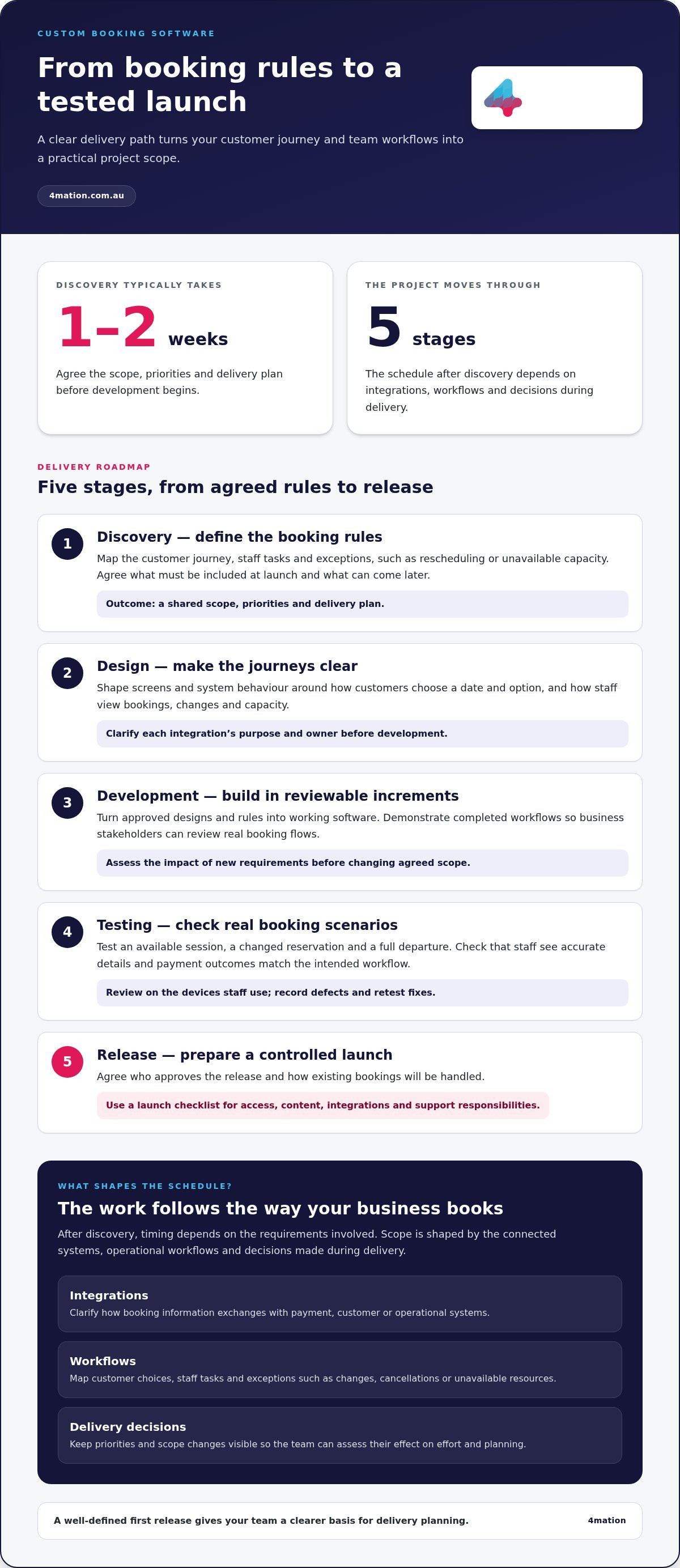
A booking platform moves through defined stages, from agreeing business rules to releasing a tested service. Discovery typically takes 1-2 weeks; the remaining schedule depends on integrations, workflows and decisions made during delivery.
Define the booking rules during discovery
Discovery turns operational needs into a practical scope. Map the customer journey, staff tasks and exceptions, such as rescheduling or handling unavailable capacity. For a tour operator, this could mean documenting how customers select a departure, how staff allocate guides and what happens when a tour is full.
Then agree on the outcomes that matter at launch. Booking confirmation, a staff view and a cancellation workflow may be essential, while reporting improvements can come later. This prioritisation gives the team a shared definition of the first release and helps prevent extra requirements from quietly expanding the project.
Turn the scope into a usable design
Design translates the agreed rules into screens and system behaviour. Customers should be able to understand available dates, select an option and see what to do next without calling reception. Staff need a clear view of confirmed bookings, changes and capacity. Reviewing these journeys before development helps reveal confusing steps while they are easier to revise.
At this stage, clarify how the platform will exchange information with payment, customer or operational systems. Define a purpose and owner for each integration. For example, decide whether a booking confirmation should update a customer record or trigger an internal task.
Build in reviewable increments
Development turns approved designs and rules into working software. The team can build connected components in increments, then demonstrate completed workflows for review. This lets business stakeholders assess a real booking flow rather than relying on a document alone.
Keep decisions and changes visible. If a new requirement affects availability, payments or staff processes, assess its impact before adding it to the agreed scope. This keeps priorities clear and supports realistic schedule management.
Test real booking scenarios before launch
Test both ordinary and exception journeys. Try booking an available session, changing a reservation and selecting a full departure. Check that staff see accurate booking details and payment outcomes match the intended workflow.
Business users should also review the platform on the devices and screens they use. Record defects, assign owners and retest fixes before release. A launch checklist can cover access, content, integrations and support responsibilities, so teams know what must be ready.
Prepare a controlled release
Before launch, agree who approves the release, how existing bookings will be handled and how staff will report issues. A staged rollout can help teams observe real transactions and resolve operational problems before wider use. After release, review customer feedback and staff questions to identify improvements based on actual use.
If you’re planning a booking platform, discuss your project requirements and the workflows your first release needs to support.
Commerce, booking, payment and operations workflows
A booking platform should connect a customer’s purchase with the operational work needed to fulfil it. Map a sample transaction from selection to completion to reveal hand-offs, missing information and delays.
Commerce and booking workflows
Start with how a customer chooses and pays for a service. A guided tour flow might include selecting an itinerary, adding equipment hire and entering participant details. The platform should carry those choices into the fulfilment record, so staff can prepare the right equipment without copying details from a separate order.
Then map what happens after purchase. A confirmed booking could generate an invoice, update a customer record and create a preparation task for the operations team. Assign an owner to each step, so it is clear who acts if a customer changes an option or a required detail is missing.
If your business sells several services together, consider how a basket handles combinations. A customer might book a class and add a related product before paying. The workflow should show one clear total and pass each item to the right team or system.
Applicable privacy and payment requirements
For privacy, define which personal details each checkout step collects and why they are needed. For payment security, design a controlled transaction flow and limit staff visibility of sensitive payment information. Australian Consumer Law cancellation and refund obligations are relevant to the terms shown before purchase and the process customers follow to cancel.
Make the customer-facing policy consistent with the internal workflow. For example, a cancellation request should create a record for review, show its status to staff and trigger the appropriate next action. This helps teams handle enquiries consistently without promising an outcome the policy does not allow.
Custom booking system features
Prioritise features that connect a customer’s transaction to fulfilment. An operations view could bring order contents, customer instructions and preparation status together. If a customer requests an accessibility adjustment, staff should see it alongside the relevant reservation instead of searching through separate messages.
Give teams clear ways to manage exceptions. A payment awaiting confirmation, an incomplete customer form or a booking requiring manual review should have a visible status and assigned next action. This helps supervisors identify work needing attention without relying on informal messages or spreadsheets.
Finally, define which records feed business reporting. Managers may, for example, need to compare sales by service type or see how often customers add related products. Agreeing on these measures before building reports helps the system support decisions, not just store transactions.
Custom booking software pricing and timelines
A useful project estimate makes its assumptions visible. It should show what the build includes, what your team needs to provide and how changes affect delivery. This gives decision-makers a clearer basis for approving investment and managing dependencies.
Build a cost plan around scope
The price depends on the project and is provided after a quote request. For a useful estimate, separate delivery work into design, software build, integration, testing and release preparation. Record the assumptions behind each area, such as who supplies content, who approves decisions and which existing systems are available to integrate.
Ask the project team to distinguish essential scope from optional enhancements. A booking business might prioritise a reliable staff workflow before adding management reports. This makes trade-offs clear: if a new requirement enters the agreed scope, stakeholders can decide whether to adjust priorities, resources or the delivery plan.
Use a change process throughout delivery. For each proposed change, document its business reason, affected work and approval owner. This prevents informal additions from becoming hidden commitments and gives finance and product leaders a record of why scope or forecasts have shifted.
Plan delivery around decisions and dependencies
A project schedule reflects more than development effort. Decision-makers’ availability, timely access to existing systems and business approvals can all affect sequencing. Identify these dependencies during planning, then assign an owner and due point to each decision.
Agree on review points that lead to a clear decision, such as approving a customer journey or accepting a completed workflow. A visible delivery plan helps stakeholders see what happens next and where a delay could affect other work. Keep release scope stable while assessing new requests through the agreed change process.
For a booking platform, payment configuration may depend on the finance team, while staff workflows may need review by operations. Identifying contributors early helps prevent late approvals from interrupting development or testing.
Account for ongoing hosting, maintenance and support
Ongoing hosting, maintenance and support costs depend on infrastructure, service levels and the work needed to keep the platform operating. The price depends on the project and is provided after a quote request. For planning, distinguish recurring hosting from maintenance tasks and support arrangements, and assign each a clear budget owner.
Set out how operational requests will be prioritised after release. A minor content adjustment differs from a change to booking rules or payment behaviour. Documenting the distinction helps your team forecast ongoing work and decide which improvements belong in routine maintenance or a separate development plan.
Review the operating budget alongside the project forecast. This gives decision-makers a view of both the delivery investment and the resources needed to manage future changes as business requirements evolve.
What features should a custom booking system include?
Prioritise features by the decisions customers and staff need to make. A training provider’s booking journey, for example, may need to help customers find the right course before choosing a date. Start with moments when people hesitate, make errors or need staff help, then select features that address those specific tasks.
Help customers find the right option
Clear search and comparison tools can make a large service catalogue easier to navigate. Someone choosing a training course could filter by subject, delivery format or prerequisites, then compare relevant details before booking. Show what each option includes, who it suits and what the customer needs to prepare.
Let customers save useful preferences, such as their preferred communication method or frequently selected service. This can reduce repeated data entry on future visits. Make settings easy to review, so customers can correct outdated details before completing another reservation.
Support repeat and linked bookings
Some businesses need to manage a series of bookings rather than one appointment. A music school, for instance, could let a customer request a regular lesson time across a term. Make the schedule and any changes clear, so customers know which sessions they have selected.
Consider linked bookings where one customer arranges services for a family member or colleague. Distinguishing the attendee from the person making the reservation helps staff communicate with the right person. Define what each user can view or update to protect privacy and avoid confusion.
Make routine administration manageable
Give authorised staff straightforward controls for maintaining service descriptions, instructions and seasonal options. An administrator, for example, could update preparation guidance for a new course without changing unrelated services. A preview before publishing helps staff catch errors before customers see the revised information.
Include practical tools for handling customer enquiries. Staff may need to find a reservation by reference, attendee name or service. Consistent search fields make records easier to locate and reduce delays during phone or email support.
Choose features that support decisions
Operational summaries can help managers understand how customers use the platform. Tracking where users abandon a booking journey, for example, can reveal confusing wording or a difficult form. Choose measures that point to an action, such as simplifying a step or clarifying service information.
Prioritise each feature by its intended user and business outcome. A focused release can address the most important customer and staff needs, while a later phase can respond to observed usage. Discuss the system your business needs.
4Mation: Custom Software Development
4mation helps businesses turn complex booking requirements into software that supports customers and day-to-day operations. Its Custom Software Development work can shape a platform around your booking rules, integrations and growth plans, rather than forcing teams into workflows that don’t fit.
Bring 4mation in when disconnected booking channels, manual administration or changing business needs call for a considered technology solution. Together, you can define the required workflows, prioritise features and plan how the platform should fit your existing systems. Where customers need to book on the go, Mobile App Development or Web Application Development may also support the experience.
To discuss your booking system requirements, contact 4mation.
Turn your booking requirements into a practical plan
A booking platform should support how your business plans to operate, not simply digitise today’s process. Before committing, identify the operational change that matters most, who will use the system and which decisions your team needs to make. This gives the project a clear basis for prioritising scope and assessing progress.
4mation can work with you on custom software development for booking workflows, AI Consulting & Implementation where intelligent automation fits, and Mobile App Development for customers who need a mobile booking experience. The right approach depends on your business goals and the role technology should play in achieving them. A focused discussion can help turn your requirements into a considered next step for custom booking system development.
Discuss your booking project with 4mation and start shaping a platform around your business needs. Your next step can be clear, practical and grounded in the outcomes you want to achieve.
Frequently Asked Questions
How much does custom booking system development cost in Australia?
The cost depends on your booking rules, customer and staff functions, integrations, data migration and testing needs. A system for reserving one service differs from a platform coordinating several service types and operational teams. For custom booking system development, define essential launch workflows first, then identify later enhancements. This gives the estimate a clear scope to assess, rather than relying on a broad figure that may not reflect your business.
How long does it take to build a custom booking system?
A booking system can be live in 6 to 10 weeks, depending on scope and delivery requirements. The schedule can change as integrations, approvals and business rules are clarified. For example, connecting a booking journey to an existing customer database requires decisions about which system owns each record. Agreeing on those details early helps the team sequence work and gives stakeholders a clearer view of decisions that could affect delivery.
Custom booking system vs off-the-shelf booking software: which is better?
Off-the-shelf software can suit a business with standard booking steps and few operational exceptions. A custom platform may fit better when workflows rely on connected resources, specialist rules or data exchanges that standard tools don’t support well. Compare each option with your actual process: how customers book, how staff fulfil reservations and how changes are recorded. Choose the approach that meets those needs without unnecessary complexity.
What steps are involved in developing a custom booking system?
Development typically moves through a sequence: define business requirements, design user journeys, build the system, test workflows and prepare for launch. First, document the decisions the platform must handle, such as eligibility or capacity. Then review designs with customers and staff. During testing, include exceptions such as incomplete reservations. Before release, assign responsibility for approvals, staff readiness and responding to post-launch issues.
How should a booking system integrate with payments, calendars and CRM platforms?
Connect each platform for a clear purpose and decide which system owns each piece of information. The booking platform might record the reservation, a payment service process the transaction, and a CRM retain customer details. Define what happens if a payment fails or a booking changes. Test these exchanges with realistic records to catch duplicate entries and mismatched statuses before customers rely on them.
How can a custom booking system handle cancellations, refunds, deposits and no-shows?
Build these actions around your published booking terms. A cancellation workflow can record the request, apply the relevant policy, update availability and flag a refund for processing. Record deposits as part of the reservation, so staff can see what has been paid and what remains. For no-shows, let staff mark attendance accurately and review booking history when handling later customer enquiries.